Login
Welcome to Litana APP. To start using the system, you must first log in. This guide will help you do so successfully.
Login Screen
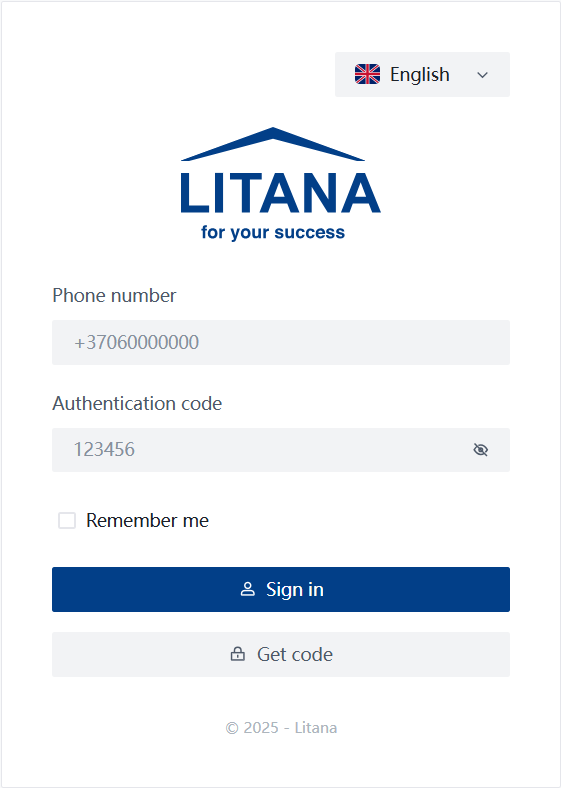
When you open the system, you will be greeted by the login screen.
Information
Login is performed using your phone number, which is registered in the system.
Login Steps
- Phone Number: Enter your phone number in the
Phone numberfield.- The format must be international, e.g.,
+37060000000.
- The format must be international, e.g.,
- Authentication Code:
- If you already have a code, enter it in the
Authentication codefield. - If you do not have a code, click the Get code button.
- If you already have a code, enter it in the
- Remember me: Check the
Remember mebox if you want the system to remember your login details for next time.SecurityDo not use the "Remember me" feature on public computers.
- Sign in: After entering the details, click the Sign in button.
How to Get a Code?
If you do not have or have forgotten your code, you can receive it via SMS.
- Click the Get code button on the login screen.
- In the window that opens, check if your phone number is entered correctly.
- Click Send code.
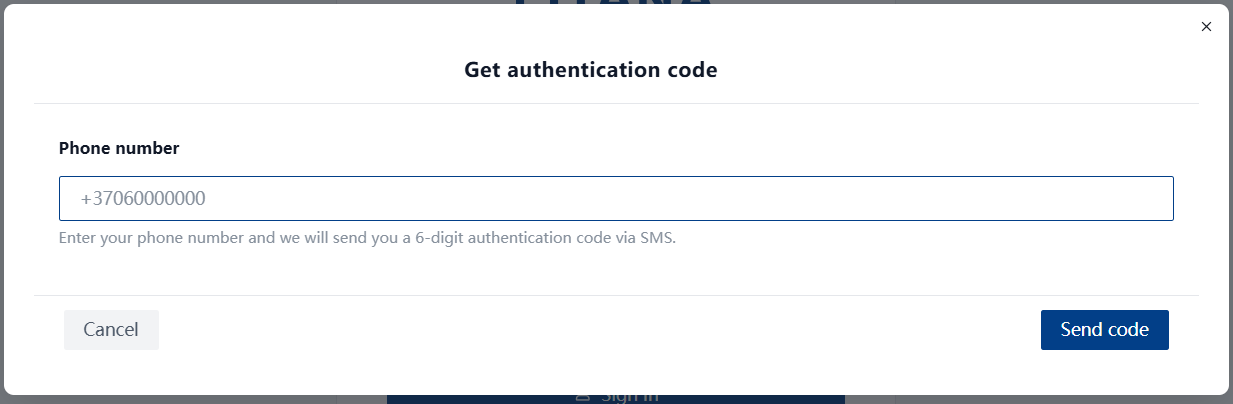
Once you receive the SMS with the 6-digit code, enter it into the login screen.
Unable to Log In?
If the system does not recognize you or you do not receive an SMS code, your phone number might not be listed in the employee database.
Help
If you encounter problems or have questions, please contact the IT department:
- 📧 Email: Erikas.Zvicevicius@litana-group.com
- Please provide a description of the problem and, if possible, attach a screenshot.
success
✅ Information complete and verified.